
An accidental Disallow: / can stop Google from crawling every page on a live site. A carefully scoped rule can spare a busy site requests to unimportant URL variations. Both outcomes come from the same small file.
Robots.txt tells compliant crawlers which paths they may request. It is often confused with an instruction to remove pages from search results or with protection for private content. Neither assumption is safe. A blocked URL can still appear in Google, and anyone can open the file.
The practical question is what you want to achieve for each URL. This guide explains which paths are sensible candidates for a block, what must stay open, and how to check the result after publishing. You will also see when noindex or authentication is the better tool.
Quick summary
- Robots.txt manages crawling. It does not reliably keep a web page out of search.
- Leave important pages and the resources needed to render them accessible.
- Block known, low-value URL patterns only after checking useful exceptions.
- Test the live file and representative URLs after each change.
What is robots.txt in SEO?
Robots.txt is a plain text file at the root of a website host, such as https://www.example.com/robots.txt. It tells compliant crawlers which URL paths they may access. Google uses it mainly to manage crawling traffic, according to its introduction to robots.txt.
Rules apply to the host, protocol and port serving the file. A file on www.example.com does not automatically govern shop.example.com. If no rule restricts a path, Google can crawl it by default. That permission is only one step in the search process. It does not promise that Google will index the page.
How do robots.txt rules work?
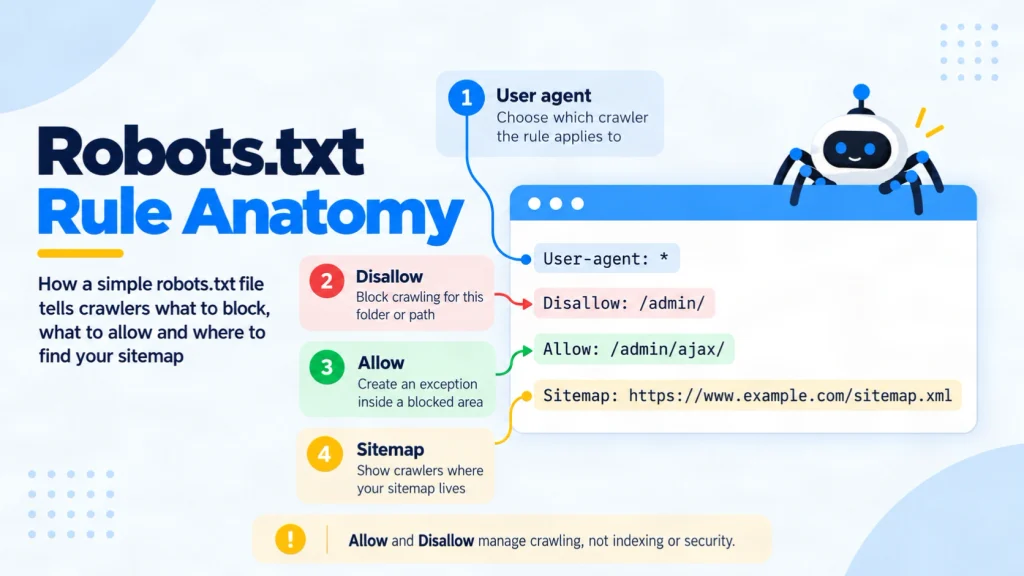
A User-agent line identifies the crawler. The * value addresses crawlers generally. Disallow names paths to avoid, while Allow creates an accessible exception. An optional Sitemap line gives the full URL of a sitemap. It does not cancel a blocking rule.
Here is an illustrative, untested file for a site where /search/ holds internal results and /search/help/ is a useful public guide:
User-agent: *
Disallow: /search/
Allow: /search/help/
Sitemap: https://www.example.com/sitemap.xml
For Google, /search/?q=blue is blocked, /search/help/ is allowed, and /services/ remains allowed by default. Google applies the most specific matching path; if equally specific rules conflict, Allow wins. Paths are case-sensitive, so test the real URL variants. These rules follow Google’s robots.txt specification.
What should you block with robots.txt?
Block a known URL pattern when fetching it serves little search purpose or creates unnecessary crawler requests. Start with actual paths and their intended search role. Do not copy a platform-wide template without checking what your site serves at each path.
Internal search results or large sets of filtered URLs can be candidates if those variations do not need to appear in Search. Google’s faceted navigation guidance advises leaving useful item pages and a main listing accessible while limiting unwanted filter combinations. Some filtered landing pages may have a valid search purpose, so a blanket parameter block needs review.
For a small site whose useful pages are already crawled, there may be no crawl problem to solve. Google’s crawl budget guide is aimed mainly at large or rapidly changing sites. A rule should answer a demonstrated need, such as an infinite URL space or server load, rather than a generic desire for a cleaner file.
What should you allow?
Keep the pages you want Google to evaluate accessible: key services, products, articles and relevant category pages. Allow the CSS, JavaScript and images that Google needs to understand those pages. Google’s resource blocking guidance warns that blocked resources can make dependent pages harder to analyse.
Also leave a public page crawlable if you want Google to see its noindex instruction. A robots.txt block prevents Google from fetching the page and reading its meta tag or X-Robots-Tag header. Google’s noindex instructions explain this requirement.
You do not need Allow: / just to permit ordinary crawling. It is the default without a conflicting restriction. Use a specific Allow when a genuinely useful path sits inside a blocked area, as in the example above.
What can robots.txt not do?
Robots.txt does not control every stage of search or enforce access to private information. Pick the control that matches your goal:
| Goal | Appropriate control | What to verify |
|---|---|---|
| Reduce crawler requests to a known, unimportant pattern | Narrow robots.txt Disallow | The pattern is blocked and useful exceptions remain open. |
| Keep an accessible web page out of Google Search | Crawlable noindex meta tag or HTTP header | Google can fetch the page and detect the instruction. |
| Protect confidential content | Authentication and server access control | An unauthorised request cannot retrieve the content. |
Google may discover a blocked URL through links and show its address without a page description. Blocking that URL and adding noindex to its page does not solve the conflict because Google cannot read the tag. The file is public, and some crawlers may ignore it.
How do you create and test a robots.txt file?
You need access to the root of the host or to the CMS setting that serves its robots.txt file. Decide the expected result for a few real URLs before changing any rule.
- List representative URLs. Include an important page, one intended blocked path, a useful exception and any separate subdomain. Record which crawler the rules should address.
- Draft and publish the file. Save plain UTF-8 text as
robots.txtat the host root. CraftDigitally’s robots.txt generator and checker can help draft or inspect a file, but review every path before publishing. Google’s file creation guide explains the location and format. - Check the served file. Open the exact
/robots.txtaddress. In the Search Console robots.txt report, confirm Google’s fetched version and any parsing warnings or errors. - Test exact URLs. Use Search Console’s URL Inspection tool to compare crawl access for the important page, blocked example and exception. A positive live test shows access, not guaranteed indexing.
- Recheck after deployment. Confirm the intended paths still behave correctly and watch affected URLs in Page Indexing. Google normally discovers file updates automatically. Request a robots.txt recrawl in the report when an urgent correction needs attention.
Common robots.txt mistakes
- Leaving
User-agent: *withDisallow: /on a live site blocks compliant crawlers from every path. - Adding
noindexinside robots.txt does not work for Google. Put it on the crawlable page or in its HTTP response. - Blocking a broad directory or rendering resource can affect useful URLs you did not intend to restrict.
- Assuming
Crawl-delayslows Googlebot is incorrect. Google does not support that directive in robots.txt.
Recheck the file after a migration or routing change, when familiar paths may behave differently.
Frequently asked questions
-
Is robots.txt still used?
Yes. Google and other compliant crawlers use it for access rules. Its value depends on your URL structure and crawler needs, not on having a file for its own sake.
-
Is robots.txt legally binding?
It is an advisory technical protocol that cannot force a crawler to comply. Legal effects depend on the facts and jurisdiction, so do not use it as a legal or security barrier.
-
What happens if a robots.txt file is missing?
Google generally treats a missing file as no crawl restrictions. Other access controls, server errors or page-level index rules can still affect a URL.
-
Does each subdomain need its own file?
Yes.
shop.example.comandwww.example.comhave separate roots. Test each host’s file and the URLs it governs. -
Does Google follow a Crawl-delay rule?
No. Google does not support
Crawl-delayin robots.txt. Investigate server capacity and Google’s crawling guidance if requests cause strain. -
Can robots.txt block an image from Google Images?
It can stop Googlebot from crawling a media file when the matching rule applies. Check the exact image URL and whether it is served from another host.
Final thoughts
Start with each URL’s intended outcome. A narrow robots.txt rule may fit when the goal is to reduce crawler requests to a known, low-value pattern. Keep important pages and their rendering resources accessible. Use a crawlable noindex when a public page should be excluded from Google, and require authentication for private content.
Then test the live file against real allowed and blocked URLs. Review the report after changes and confirm that the result matches the goal. If the rule affects many routes or you cannot explain its exceptions, map the URL set before release. CraftDigitally’s technical SEO service can review the live evidence and give your team a precise fix.
See this on your own site, for free.
The audit runs this exact check against your live pages.

Written by
Kartik SharmaKartik works across keyword research, on-page SEO, content optimisation and technical improvements. He focuses on strengthening website relevance, improving search visibility and supporting consistent organic growth.
