
An XML sitemap is a file that lists the URLs you want search engines to discover. It can help Google find a new page, but listing that page does not mean Google will crawl or index it. That distinction matters when a sitemap appears healthy while important pages remain absent from search results.
The practical task is to publish a file that reflects your preferred, accessible pages and then read the right evidence when something goes wrong. A broken file, an invalid URL inside it and a page that Google chooses not to index require different responses. This guide explains what belongs in an XML sitemap, how to create and submit one, and how to diagnose common errors. It also shows what to check after a fix, so a successful submission is not mistaken for proof that every page is indexed.
Quick summary
- A sitemap helps search engines discover URLs; it does not guarantee indexing.
- Include preferred pages that you want indexed, and keep redirects and errors out of the list.
- Use accurate update dates, and split files that exceed Google’s size limits.
- Diagnose the sitemap file and individual page URLs separately in Search Console.
What is an XML sitemap?
An XML sitemap is a structured URL list for search engines. Each entry has a <loc> value containing the full URL and may have a <lastmod> update date. An HTML sitemap is a navigable page for visitors.
Here is a minimal example based on the sitemap protocol’s required structure:
<?xml version="1.0" encoding="UTF-8"?>
<urlset xmlns="http://www.sitemaps.org/schemas/sitemap/0.9">
  <url>
    <loc>https://www.example.com/services/</loc>
    <lastmod>2026-10-01</lastmod>
  </url>
</urlset>
The address and date are illustrative. Google says a sitemap is especially useful for large or new sites and media-rich content. Well-linked pages can often be discovered without one. A sitemap cannot replace crawlable internal links.
Which URLs belong in an XML sitemap?
Include the version of each page you want Google to show. Choose the preferred canonical URL and check that the page is accessible and intended for indexing. A sitemap is a weak canonical signal, so Google can still select another version.
Include important product, service and article URLs that return a successful response. Remove URLs that redirect, error or duplicate another page. Exclude pages marked noindex, such as private thank-you pages. If a valuable page is blocked in robots.txt, fix that rule; a sitemap entry cannot override it.
Google’s canonical URL guidance recommends absolute URLs and the preferred version of duplicate content. Specialist extensions for images, videos and translated pages are optional.
XML sitemap best practices that matter to Google
Keep the file current as pages move or change. Let your CMS generate it if the output reflects your indexing rules. Review it after a migration or template change.
Use <lastmod> only when accurate. Google may use it for meaningful changes to content, structured data or links. A footer date change is insufficient. Google ignores <priority> and <changefreq>.
Google’s XML sitemap requirements limit each file to 50,000 URLs or 50 MB uncompressed. Use UTF-8, escape special characters and split larger sets using a sitemap index. A valid file can still contain unsuitable URLs.
How do you create, find and submit a sitemap?
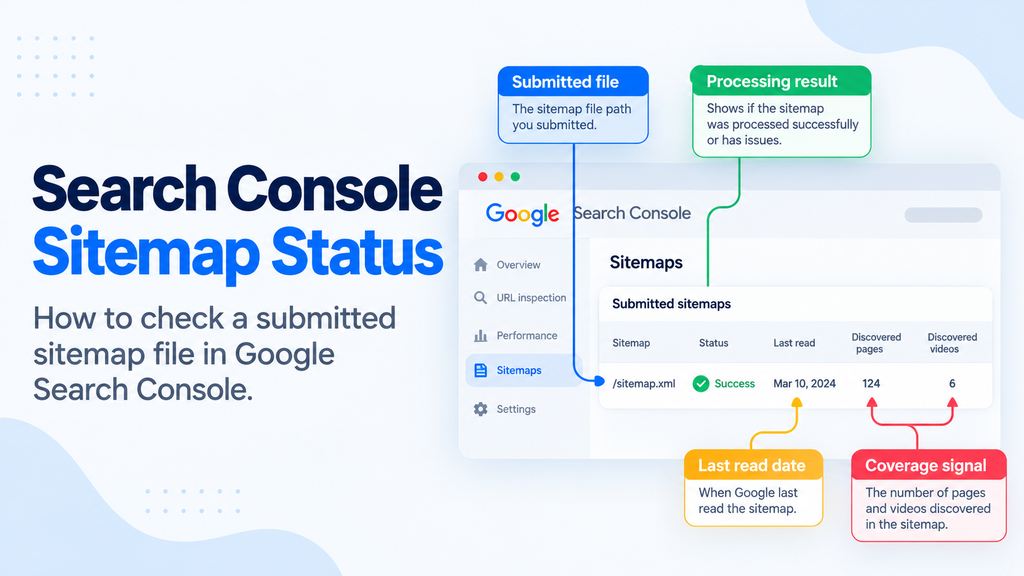
First, check whether your platform creates one. Look for a Sitemap: line in robots.txt, consult your CMS or try /sitemap.xml and /sitemap_index.xml. These are conventions, not mandatory paths. Google permits other locations under its sitemap location rules.
- Choose the pages you want indexed and remove redirecting, duplicate or excluded URLs from the generator’s output.
- Generate the XML with your CMS or a maintained tool. Open the final URL and confirm the expected entries, valid XML and an accessible response.
- Submit its complete address in the Search Console Sitemaps report for the correct property. You can also advertise the address in
robots.txtwith aSitemap:line. - Return to the report to check whether Google fetched and read it. A submission alone confirms neither successful processing nor page indexing.
Google’s submission instructions cover both routes. A small, stable site can maintain a file manually; a changing catalogue usually needs automation.
Common XML sitemap errors and how to fix them
Start with the Sitemaps report status, then inspect a representative URL. Google’s Sitemaps report help distinguishes a file it cannot fetch from a readable file with errors. Individual page indexing has its own evidence.
| Evidence | Likely issue | Fix and verification |
|---|---|---|
| Couldn’t fetch | The sitemap address may be wrong, blocked, unavailable or affected by a temporary server issue. | Open the exact submitted URL. Use a live URL Inspection test to check crawl permission and page fetch, fix the response or block, then resubmit after a persistent failure. |
| Sitemap had errors | XML may be malformed, contain an invalid date or URL, or exceed the file limit. | Open the specific report error and line, repair escaped characters or tags, correct dates or split the file, then confirm Google can read the new version. |
| URLs not accessible or not followed | An entry may redirect repeatedly or point to a page that cannot be fetched. | Inspect that entry, repair the live page if it should exist, or replace the sitemap URL with its final preferred destination. |
| Sitemap succeeds, page not indexed | The file was read, but the page may be blocked, noindex, a duplicate or simply not selected for indexing. | Check the page in URL Inspection and Page Indexing. Fix the reported page issue where appropriate, then check again after Google recrawls it. |
Deleting a submitted sitemap does not erase Google’s knowledge of its URLs. Update the file and address the page itself. A healthy sitemap can contain an unindexed page.
A worked fix and the checks that follow
Illustrative scenario: a business moves /old-guide/ to /new-guide/ with a permanent redirect. Its sitemap still lists the old address, and Search Console reports that some URLs were not followed. The correct sitemap entry is the final, preferred /new-guide/ URL, provided that page is live and intended for indexing.
The implementer updates the generator’s URL source, regenerates the sitemap and confirms that the new address appears while the old one does not. Next, they check the Sitemaps report for a successful read and use URL Inspection’s indexed and live views on the new page. The live test should show that Google can fetch the page, but that result alone does not promise indexing. If the page remains excluded, its specific Page Indexing reason becomes the next task. The site should also link internally to the new address instead of relying on the sitemap as its only discovery route.
XML sitemap FAQs
-
Does an XML sitemap guarantee indexing?
No. It helps Google discover URLs, but Google decides whether to crawl and index each page.
-
How do I create an XML sitemap?
Use your CMS’s sitemap feature or a generator, select preferred indexable URLs, validate the file and submit its address in Search Console.
-
How do I find a website’s XML sitemap?
Check the site’s
robots.txtfor aSitemap:line. You can also try common paths such as/sitemap.xml, but the filename may differ. -
Is an HTML sitemap the same thing?
No. An HTML sitemap is a page of links for visitors. An XML sitemap is a structured file that helps crawlers discover URLs.
-
Should I update
<lastmod>every day?Only when the page has changed meaningfully and the date is accurate. Google can ignore dates that do not match real changes.
-
Does a small website need an XML sitemap?
Not always. Google can usually find well-linked pages, but a sitemap remains useful for discovery and monitoring.
Conclusion
A useful XML sitemap is a current list of your preferred pages, not a promise that they will appear in search. Start by checking which URLs your website actually publishes, then confirm that the file contains the versions you want indexed. If Search Console reports a problem, identify whether the fault is in fetching the file, parsing an entry or evaluating a particular page. Apply the matching fix and verify the result in the relevant report.
For a routine site, keep generation automated and review the output after major content or URL changes. If sitemap entries, canonical choices and indexing reports disagree across many pages, a broader technical SEO audit can turn those findings into specific developer changes and follow-up checks.
See this on your own site, for free.
The audit runs this exact check against your live pages.

Written by
Kartik SharmaKartik works across keyword research, on-page SEO, content optimisation and technical improvements. He focuses on strengthening website relevance, improving search visibility and supporting consistent organic growth.
