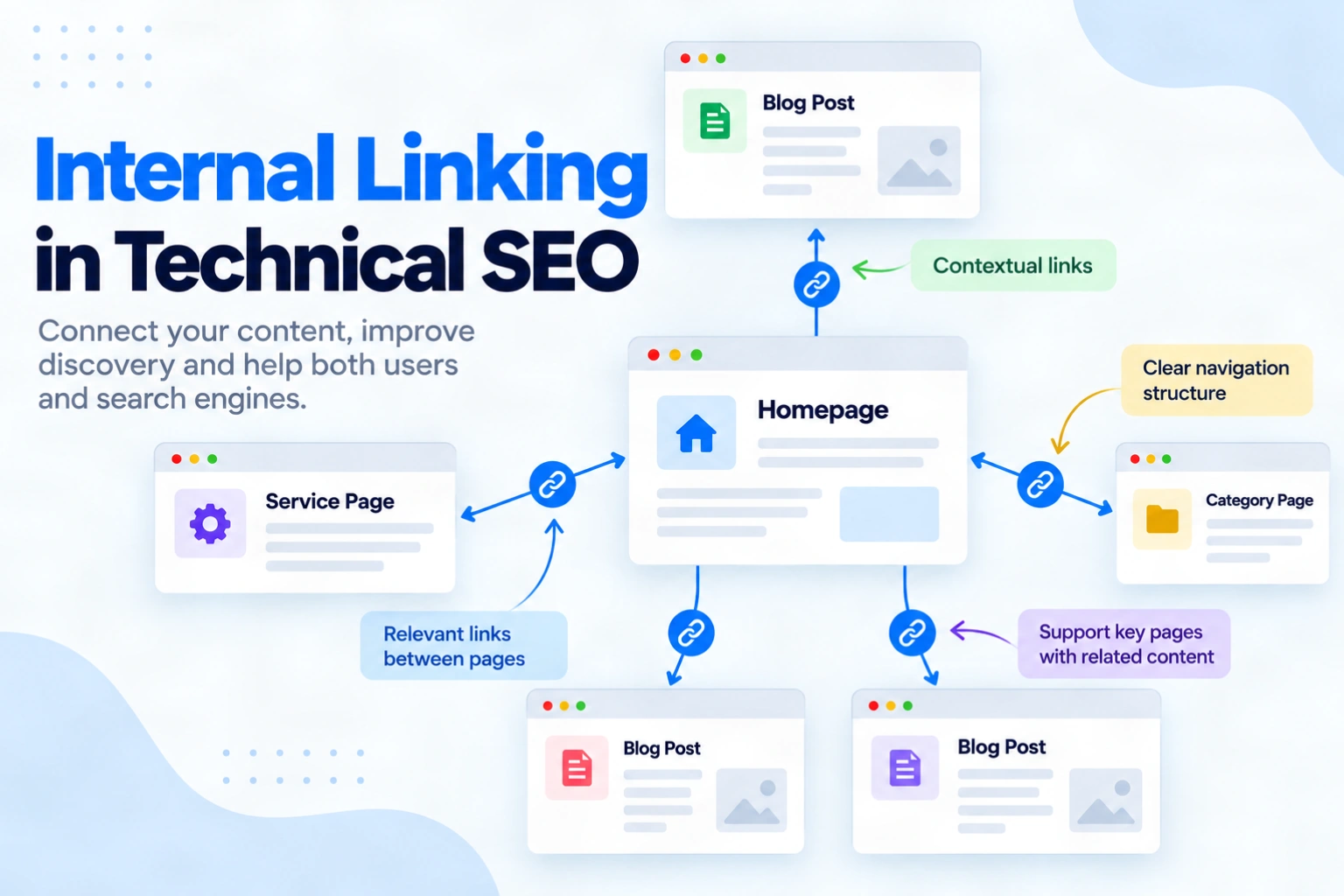
An important page can be live and appear in your XML sitemap, yet still be hard to reach from the pages people visit. Sometimes its only link sits in an old menu. Sometimes a redesign removes that route altogether. Internal linking gives visitors and search crawlers a path between related pages, but adding links at random will not repair a weak site structure.
A useful audit asks where a link starts, what it points to and whether someone can follow that route from a findable page. It also checks whether the destination is the URL you want to keep. This guide explains how to build those paths, find broken or missing links and verify each fix. You can use the same process when publishing a new page or reviewing links after a migration.
Quick summary
- Internal links connect pages on the same website through navigation, breadcrumbs or page content.
- Choose a reachable source page that naturally helps readers reach a useful destination.
- Audit link paths, targets and anchors before treating a crawler warning as a fix request.
- Retest the rendered link and final URL after publishing.
What is internal linking in technical SEO?
An internal link takes a visitor from one page on your website to another page on the same website. An external link leads to a different site. Internal links can appear in menus, breadcrumbs, related-content blocks or the main text.
The technical part is the actual source-to-target path. Google’s link best practices for Search explain that a normal crawlable link uses an HTML <a> element with an href attribute. The visible anchor text should describe the destination.
Here is an illustrative HTML link to a published CraftDigitally article:
<a href="/blog/orphan-pages-seo/">how to fix orphan pages</a>
The href supplies the target, while the words tell the reader what to expect. A JavaScript click handler without a real href is less reliable for Google to extract. A JavaScript-rendered anchor can work, but check the rendered page before relying on it.
Why does internal linking matter?
Links help visitors move to the next useful page and help Google discover URLs and interpret their relevance. Google’s developer guidance on findable pages recommends making every page reachable through a link from another findable page.
A sitemap can also help discovery, but it does not create a route for someone browsing your site. If a page is deliberately excluded from navigation, first decide whether it belongs in search and how visitors should reach it. An internal link can improve access and context; it cannot guarantee indexing, traffic or a higher ranking.
How do you build a useful internal linking structure?
Start with the pages people need, then select routes that make sense from their current task.
- Choose priority destinations. List core services, product categories and helpful guides. Check which pages should remain live and indexable, and identify the preferred URL for each one.
- Find relevant source pages. Look for a reachable category, hub or related article whose reader would benefit from the destination. A link from another disconnected page does not repair the path.
- Choose the placement. Use navigation or breadcrumbs for a stable hierarchy. Add a contextual link where a deeper explanation or next action genuinely helps. A sitewide footer link is not required for every guide.
- Write the anchor and publish. Describe the target in natural words. Avoid vague labels and repeated keyword-heavy text. Confirm that the actual page contains a working link, rather than trusting an editor preview.
CraftDigitally’s technical SEO introduction covers the wider process. Its guide to orphan pages addresses a narrower diagnosis. A link between them would help a reader investigating missing paths. Check the actual source before adding it.
Do not impose an exact number of clicks from the homepage on every URL. Give high-value pages an obvious route, then judge deeper pages by their purpose and how visitors actually browse.
How do you audit internal links?
An audit compares what a link-following crawler can reach with the pages you intend people to find. It then checks whether the existing links lead to useful, preferred destinations.
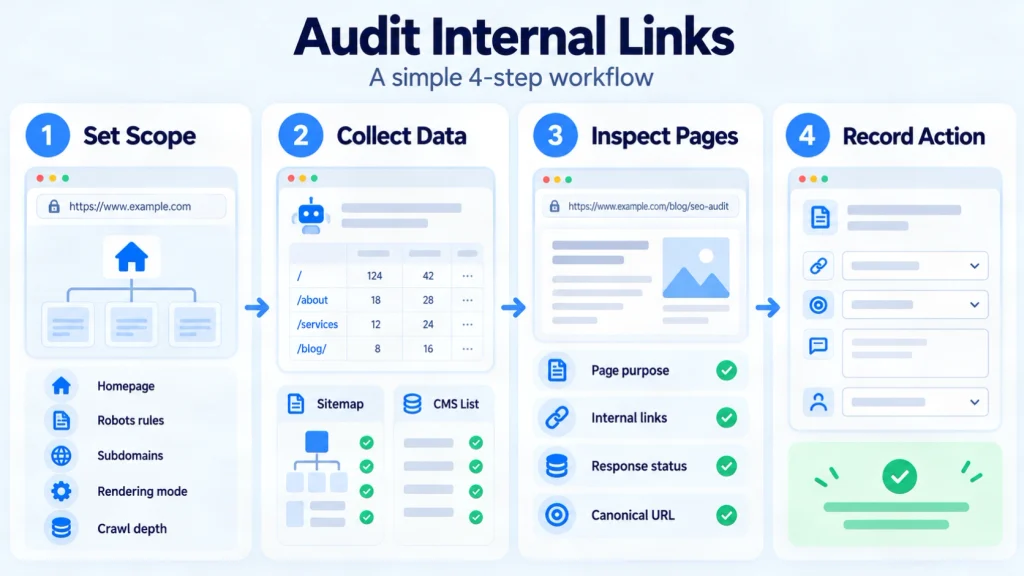
- Set the crawl scope. Start from the homepage or relevant section. Record robots restrictions, subdomain boundaries, rendering mode and depth limits. Those settings affect which links the tool can report.
- Collect URL evidence. Export reached pages, unique incoming links, source URLs, targets and crawl depth. Screaming Frog’s internal linking audit tutorial explains these reports. Compare the crawl with your CMS and sitemap list to spot known pages the crawl missed.
- Inspect important candidates. A low inlink count alone is not a defect. Check the page’s purpose, the source’s reachability, the link’s rendered HTML, its response and its canonical target. A page found only in a sitemap needs separate investigation.
- Record a specific action. Note the source URL, target URL, anchor, placement, reason and person responsible. Give the developer a page-level acceptance check, not just an issue count.
| Finding | Check before acting | Useful action |
|---|---|---|
| Important page has no reachable incoming path | Confirm it is live, useful and within crawl scope | Link from a relevant page visitors can reach |
| Internal link returns 404 | Check whether the target has a close replacement | Update to the replacement or remove the obsolete link |
| Link passes through a redirect or points to a duplicate | Confirm the preferred final URL | Update the source link to that URL |
| Anchor is vague or misleading | Read the source sentence and destination | Replace it with accurate, concise text |
Google advises linking to the canonical URL rather than a duplicate when choosing an internal target. Search Console’s Links report has sampling limits, so an absent row does not prove a link is missing.
How do you optimise without adding noise?
Prioritise the links that answer a visitor’s likely next question. Menus and breadcrumbs establish broad routes. Contextual links can connect a detailed explanation with a relevant service, category or supporting guide. Both can be useful without appearing on every page.
Use descriptive anchors, but vary them when the surrounding sentences call for different wording. Google’s guidance says there is no magical ideal link count. The same applies to a universal three-click rule: a crawl-depth warning is a cue to inspect an important page, not proof of harm. Update old internal links to the live, preferred URL when content moves.
How do you verify and maintain the links?
After publishing, open the source page and find the link in its rendered HTML. Check that its href points to the intended URL and that the visible words match the destination. Follow it and confirm the destination loads the preferred live page. If JavaScript inserts the link, test what Google can see in URL Inspection where appropriate.
Then rerun a crawl with the same starting point and settings. Confirm that the target is now reachable from the expected source and that broken links or redirect hops have been removed. A crawler count is useful evidence, but it does not prove an indexing or ranking result.
Add this check to the publishing process and repeat it after redesigns, URL moves and navigation changes.
Frequently asked questions
-
How many internal links should a page have?
There is no fixed Google target. Add links that help visitors navigate and understand related pages. Remove repetitive or distracting links.
-
Can an XML sitemap replace internal links?
No. A sitemap can help search engines discover a URL, but it does not give visitors a path through the site or guarantee indexing.
-
Do footer links count as internal links?
Yes, if they are crawlable links to pages on your site. Use them for useful sitewide destinations, not as a substitute for relevant navigation.
-
Should every anchor exactly match a keyword?
No. Describe the destination accurately in the sentence’s context. Repeating the same exact phrase everywhere can make the writing awkward.
-
Can JavaScript-generated internal links work?
Yes, when rendering creates a crawlable anchor with an
href. Check the rendered page because click handlers alone may not expose a URL reliably. -
How often should I audit internal links?
Check them after publishing, migrations and navigation changes. Set a regular review cadence that fits the size and rate of change of your site.
Conclusion
Start with one important page that is hard to reach. Identify a relevant source people can already visit, add a descriptive crawlable link and point it to the preferred live URL. Record why that connection belongs there.
Then crawl from the same starting point and confirm the source, target and link text on the published page. Repeat the process for broken links and pages exposed only by a sitemap. An internal linking audit should give implementers a concrete change and acceptance check, not just a warning list. For a larger site or a redesign, CraftDigitally’s technical SEO audit service can help prioritise routes and verify changes across templates.
See this on your own site, for free.
The audit runs this exact check against your live pages.

Written by
Ishi YadavIshi works across SEO and content strategy, with expertise in keyword research, content optimisation, internal linking and competitor analysis. She focuses on creating search-focused content that improves visibility and relevance.
