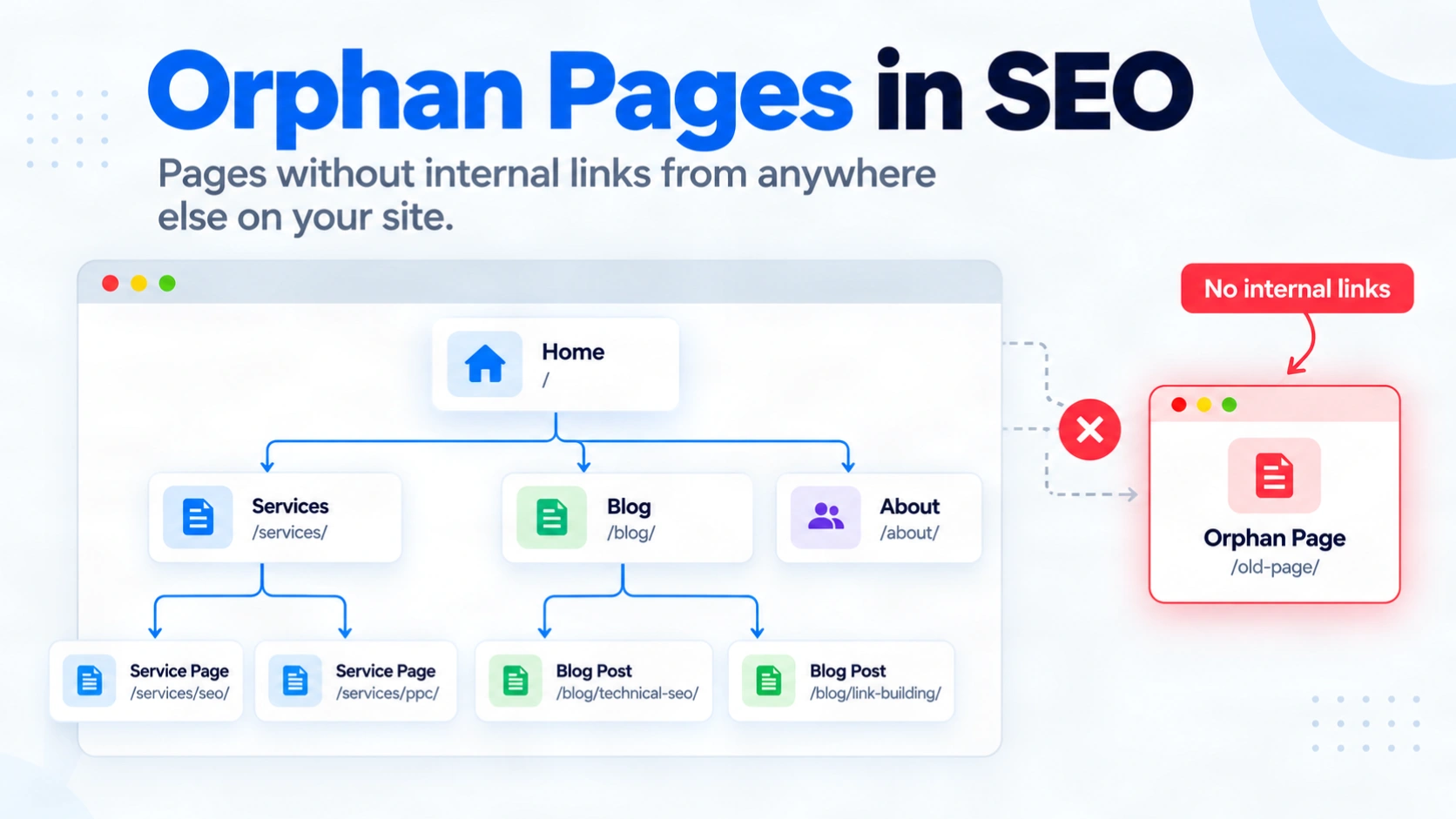
A useful page can be live, appear in your XML sitemap and still have no clear path from the rest of your website. Visitors may never encounter it while browsing, and a crawler following your site’s links may miss it. That is the practical problem behind orphan pages in SEO.
The fix starts with finding the right URLs. A basic crawl follows links it can see, so it cannot reveal every page that has been left outside that path. You need to compare its results with a separate list of known URLs, then inspect each candidate. Some pages need a relevant internal link. Others are old, duplicated or deliberately kept out of normal navigation. This guide shows how to make that decision, check the result and prevent the same problem when you publish or move pages.
Quick summary
- An orphan page has no incoming internal links. Some tools also flag pages unreachable from the crawl’s starting point.
- Compare a link crawl with your sitemap and other known-URL sources to find candidates.
- Confirm the page’s purpose before adding a link, redirecting, removing or keeping it unlinked.
- After a fix, verify a reachable source page links to the intended URL.
What are orphan pages in SEO?
An orphan page is a live page with no incoming links from other pages on the same site. Someone may still open it from a bookmark, a direct URL, a sitemap or an external link. Its lack of internal links does not automatically mean Google has never found or indexed it.
There is a useful tool distinction. A link crawler starts at a chosen page, often the homepage, and follows links from there. It may label a group of pages unreachable even when those pages link to each other. Screaming Frog’s official orphan page tutorial explicitly includes these isolated clusters. Check whether the tool means zero incoming links or no path from its crawl start.
Why do orphan pages happen and matter?
Orphans often appear after a redesign removes a menu item, a migration leaves an old URL live, or a CMS publishes a page without adding it to an archive. A paid campaign page may be left out of navigation intentionally.
The main risk is a missing route for people and link-following crawlers. Google’s guidance on crawlable internal links says links help it discover pages and understand their relevance. Google can also learn about a URL through a sitemap or another site’s link. Its sitemap guidance on discovery makes clear that inclusion does not guarantee crawling or indexing.
Treat an orphan flag as a prompt to investigate, not proof of a ranking loss. A page’s content, indexability, canonical, status and intended audience still matter.
How can you find orphan pages?
Use two views of the website: pages reached by following internal links and URLs known from other sources. Compare them, then verify the difference.
- Crawl from a reachable starting page. Begin at the homepage or the appropriate section hub. Record the internal HTML URLs found through links and any crawl restrictions. A crawler can only report the path it was allowed to follow.
- Build a separate list of known URLs. Export your XML sitemap and published URLs from the CMS. Add relevant landing pages from analytics, Search Console or server logs where available. A page can be absent from any one source, so record where each URL came from.
- Compare the lists. URLs in the known list but absent from the link crawl are candidates. Check whether trailing slashes or parameters identify equivalent or distinct pages before treating rows as different URLs.
- Inspect each important candidate. Check whether it returns a live page, redirects, has a noindex rule, declares another canonical, or sits outside the crawl’s scope. Inspect the source page if you suspect a link exists but the crawler missed it.
Screaming Frog’s documented SEO Spider workflow can combine sitemap, Analytics and Search Console sources with a crawl. Its full integrated workflow requires a licence. The comparison itself is tool-independent: the extra sources reveal candidates a link-only crawl cannot see.
Search Console is useful for checking known URLs, but it is not a complete orphan-page detector. Google’s Links report explains its limits: it shows a sample and can omit URLs. Its URL Inspection help explains referrers: an empty referring-page field does not prove that no internal link exists.
How should you fix an orphan page?
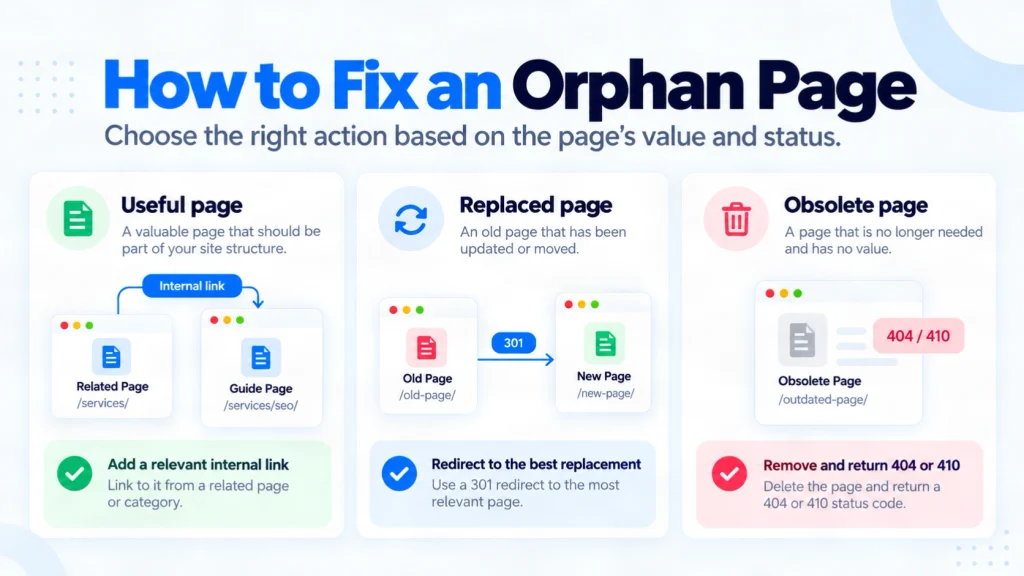
First decide whether the URL deserves to remain a useful, separate page. The same orphan flag can call for different actions.
| Page condition | Sensible action |
|---|---|
| Useful and intended for search | Add a descriptive link from a relevant page people and crawlers can already reach. Include it in navigation or an archive where that fits. |
| Replaced by a genuinely relevant new page | Move any useful information, then use a permanent redirect from the old URL. Update existing links and the sitemap. |
| No longer useful and no suitable replacement | Remove it and return a proper 404 or 410 response. Remove stale sitemap entries. |
| Intentionally separate, such as a campaign page | Keep it unlinked if that serves its purpose. If it must stay out of Google Search, use noindex while allowing crawling. |
Consider an illustrative guide that still answers a real question but appears only in the sitemap. Add a contextual link from a reachable related guide or category page. Then check that the source contains a working HTML link to the live guide. Do not add a link from another isolated page and assume the route is repaired.
If the URL has moved, Google’s guide to permanent redirects explains the signal to the new destination. Redirect to a close replacement, not a convenient but unrelated homepage. For an intentionally unlinked page, Google’s noindex implementation guidance requires the rule to remain crawlable.
How do you prevent and verify orphan pages?
Give each new indexable page a place in the site before publication. A blog post may belong in an archive and a related article. A product should remain reachable through an appropriate category or replacement path. Before a migration or menu change, check which existing pages will lose their only incoming link.
After release, verify the intended path rather than counting a new link in an editor. Open the source page and confirm the link appears as a crawlable HTML anchor with an href. Follow it to the final URL. Then rerun a link crawl from the same starting point and confirm that it reaches the page. Google’s developer guidance on site links recommends a link from another findable page.
Finally, use URL Inspection to check Google’s latest known version of an important page. Its indexed data may lag behind your live fix. Neither a successful crawl nor an indexing request guarantees a ranking or even indexing. Repeat the URL-list comparison after publishing, redesigns and migrations so new candidates do not go unnoticed.
Frequently asked questions
-
Can an orphan page still be indexed?
Yes. Google may discover it through an XML sitemap, an external link or a link that existed earlier. Orphan status alone does not establish index status.
-
Is an XML sitemap enough to fix an orphan page?
No. A sitemap can help discovery, but it does not create a navigation path for visitors or guarantee that Google will crawl or index the URL.
-
Can Google Search Console find every orphan page?
No. Its Links report is a sample, and a missing referring page is not proof of no links. Compare several URL sources with a link crawl.
-
Should I link to every orphan page?
No. Link useful pages that deserve a place in the site. Redirect relevant replacements, remove obsolete pages, and assess deliberately unlinked pages separately.
-
Can orphan pages link to each other?
Yes. An isolated group may contain internal links but still have no reachable path from your crawl’s starting page. Link into the group from a reachable page if it belongs in the site.
-
Is an orphan page the same as a dead-end page?
No. An orphan page lacks incoming internal links. A dead-end page lacks outgoing internal links. A page can meet either or both descriptions.
Conclusion
Start with the pages that matter to your visitors and your business. Compare a link crawl with the URLs in your sitemap, CMS and available search or analytics data. Confirm each candidate before changing it, because a report can mix valuable pages, old redirects and intentional exceptions.
For a useful page, create a relevant link from somewhere people can already reach. For a moved or obsolete URL, choose a redirect or removal that matches what happened to its content. Then rerun the crawl and inspect the source link, destination and status. If you need help tracing those routes across templates, CraftDigitally’s technical SEO audit service can turn the findings into specific fixes for your developer.
See this on your own site, for free.
The audit runs this exact check against your live pages.

Written by
Ishi YadavIshi works across SEO and content strategy, with expertise in keyword research, content optimisation, internal linking and competitor analysis. She focuses on creating search-focused content that improves visibility and relevance.
