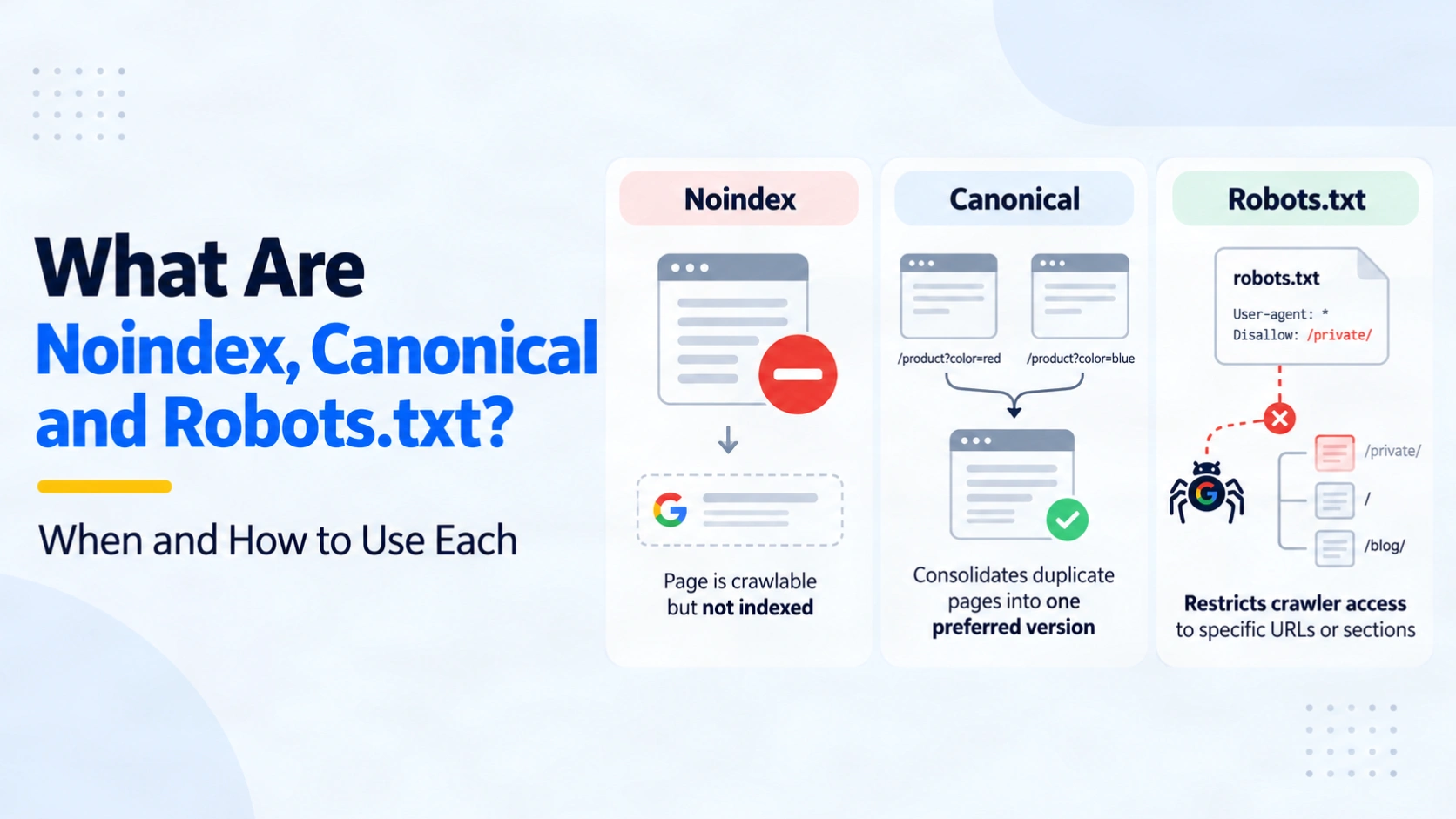
A page can load perfectly for visitors yet be missing from search, indexed under another URL, or inaccessible to a crawler. Those outcomes call for different fixes. Noindex vs Canonical vs Robots.txt is a choice about what you want Google to do with a URL: leave it out of the index, prefer a duplicate version, or stop crawling it.
Choosing the wrong control creates confusing results. A robots.txt block can leave a URL visible in search. A canonical can be ignored when two pages are substantially different. A noindex rule cannot work if Google cannot reach the page to read it. Before editing a template or a robots file, decide which outcome you need. Then check the live response and Google’s view of the URL after the change. The examples below show how to make that choice without treating these controls as interchangeable.
Quick summary
- Use noindex when a public page must remain accessible but should not appear in Google Search.
- Use canonical when multiple crawlable URLs carry duplicate or very similar content and one should be preferred.
- Use robots.txt when you want compliant crawlers to avoid fetching a URL pattern. It does not secure content or guarantee removal from search.
- Keep the URL crawlable when Google needs to read a noindex rule or a canonical hint.
Noindex vs canonical vs robots.txt: the difference
Each control acts at a different point. Robots.txt governs whether a crawler may request a path. Noindex tells Google to exclude a page or resource after it can fetch the rule. A canonical identifies your preferred representative among duplicate or closely similar URLs. Google treats that preference as a signal and may select another canonical.
| Control | Main job | Where it lives | What it does not guarantee |
|---|---|---|---|
noindex | Exclude a crawlable URL from Google Search | HTML robots meta tag or X-Robots-Tag HTTP header | Protection from people who know the URL |
rel="canonical" | Suggest the preferred URL in a duplicate set | HTML link element or supported HTTP Link header | Exclusion of an unrelated page |
robots.txt | Restrict crawling by compliant bots | Public file at the site’s root | Removal of the URL from search or access control |
Google’s guidance on blocking search indexing explains why a noindex rule must remain accessible to its crawler. Its canonical URL guidance recommends canonical signals for duplicates instead of using noindex merely to select a preferred version.
Which control should you use for your page?
Start with the outcome, then check whether the URL must stay accessible and whether another page serves the same search purpose.
- Keep it public but out of search? Use noindex on a crawlable thank-you page or another page with no search role. Visitors with the link can still open it.
- Show one version of duplicate content? Use a canonical hint on the duplicate. For an illustrative product URL with a tracking parameter, point to the clean product URL if the main content is effectively the same and both URLs are reachable.
- Avoid crawling a large, low-value URL space? Consider a targeted robots.txt rule for generated internal search paths. First confirm that no URL in that pattern needs its noindex or canonical read.
- Want this distinct page to appear in search? Leave it crawlable and indexable. Do not canonicalise it to an unrelated category or block it just because its template resembles another page.
These are illustrative choices, not a rule that every parameter URL, filtered page or thank-you page needs the same setting. A meaningful product variant may deserve its own indexable URL. If an old URL has permanently moved and need not remain available, a redirect can be more suitable than any of these three controls.
How do you implement noindex, canonical and robots.txt?
Noindex needs crawl access. Place a robots meta tag in the HTML head of a page that Google is allowed to fetch:
<meta name="robots" content="noindex">
For a PDF or another non-HTML resource, configure the server to return the documented HTTP header instead:
X-Robots-Tag: noindex
Google documents both methods in its noindex implementation guide. Do not put noindex in robots.txt; Google does not support that directive there.
Canonical needs a relevant preferred URL. For a genuinely duplicate HTML page, place a link in its head that points directly to the preferred version:
<link rel="canonical" href="https://www.example.com/products/blue-shirt/">
Use the actual, accessible destination in production. Align important internal links and your sitemap with the preferred URL.
Robots.txt needs a precise path rule. This illustrative rule disallows crawlers covered by the wildcard group from fetching /search/ paths:
User-agent: *
Disallow: /search/
Check what else matches before release. Google’s examples of robots.txt rules explain directory matching and warn that the file is public. Use a narrow rule only when preventing those requests serves a real crawl-management need.
What happens when the signals conflict?
A robots.txt disallow and a noindex on the same URL work against the intended exclusion. Google cannot fetch the page or its header to see the noindex. An externally linked URL may still appear without a description. If removal from Google Search is the goal, make the page crawlable and let Google read the noindex.
Avoid adding noindex to a duplicate merely because you want its signals associated with another URL. Use a relevant canonical when the content is substantially the same. A canonical is a preference, not a command to hide an unrelated page. Check that the preferred target loads, is crawlable and is suitable for indexing.
Neither robots.txt nor noindex protects confidential information from visitors. Robots.txt is public, and noindex still leaves the page accessible. Put private staging, account or admin content behind authentication. Google’s robots.txt rule examples explicitly caution against using disallow for private content.
How can you verify the result?
Check the implemented signal first, then Google’s recorded state. A successful deployment does not mean Google has recrawled the URL or accepted your preferred canonical.
- Open the affected URL and inspect its HTTP response and HTML head. Confirm the expected
X-Robots-Tag, robots meta tag or canonical target actually appears. For a PDF, check its response header. - Read the live
/robots.txtand confirm whether its matching rule allows Googlebot to fetch any URL that needs noindex or canonical. Check a representative URL from each affected template. - In Google Search Console, inspect the exact URL. Review crawl permission, indexing permission, the user-declared canonical and the Google-selected canonical where available.
- Compare the live test with the indexed view later. The live test checks the current page; it does not promise immediate indexing or that Google will select your canonical.
The URL Inspection tool documentation explains these fields. A robots-blocked URL may even show “Indexing allowed: Yes” because Google could not read a noindex rule. Treat that field in the context of crawl permission.
Frequently asked questions
-
What is the purpose of canonical tags in SEO?
They suggest the preferred URL among duplicate or very similar pages. Google may choose a different representative when other signals disagree.
-
What is the difference between robots.txt and meta robots tags?
Robots.txt controls crawler access to paths. A robots meta noindex rule is read from a crawlable HTML page and tells Google to leave it out of Search.
-
How do I check if a page is noindex?
Inspect its HTML robots meta tag and HTTP
X-Robots-Tagheader, then use URL Inspection to check the version Google has seen. -
Can robots.txt remove a page from Google?
No. A disallowed URL may still appear if Google learns about it through links. Use crawlable noindex for a public page you want excluded.
-
Should I noindex a duplicate page?
Usually choose a relevant canonical when the aim is to identify a preferred duplicate. Noindex is for a page you want excluded from Search.
-
Can Google ignore a canonical tag?
Yes. It is a hint. Check content similarity and conflicting signals, then inspect the Google-selected canonical in Search Console.
Conclusion
The right choice starts with the outcome for one URL. Use noindex for a crawlable page that should stay out of Google Search. Use a canonical to suggest which duplicate should represent a set. Use robots.txt to restrict crawling of paths you do not need fetched. Leave a useful, distinct landing page indexable when it deserves its own search presence.
After choosing, verify the live HTML or header, the matching robots rule and the intended destination. Then compare your setup with Google’s indexed view in Search Console. If a template affects hundreds of pages, sample every affected page type before rolling out a broad change. CraftDigitally’s technical SEO audit and fixes can help trace conflicting signals to their source and give your developer a specific change to make.
See this on your own site, for free.
The audit runs this exact check against your live pages.

Written by
Kartik SharmaKartik works across keyword research, on-page SEO, content optimisation and technical improvements. He focuses on strengthening website relevance, improving search visibility and supporting consistent organic growth.
